

Guide · Start here
Getting Started in FreeWorlds
Everything you need for your first hour in FreeWorlds: making your account, finding your way round your first home, moving, the missions that show you around, and getting to a venue with your friends.
Free account, straight into World. Already on MatchFlow? Log in with the same account.
Your first hour, step by step
FreeWorlds runs in your web browser, on a computer, a tablet or a phone. There is nothing to download. These are the steps in the order you'll meet them.
- Make your World accountGo to freeworlds.gg/join and fill in an avatar name, a username, your email, your date of birth and a password, then choose your avatar's body and agree to the policies. Already on MatchFlow? Log in with that account instead.
- Confirm your emailType in the 6 digit code World sends you. If anything is still missing, a One more step page asks for it, then you are in.
- Walk into your Beginner HouseYour first visit gives you a home of your own, a starting balance of gold and tokens, and a welcome letter in Mail.
- Get movingClick a spot on the floor and your avatar walks there, finding its own way round furniture and walls. Scroll to zoom, drag with the right mouse button (or hold Shift and drag) to look around, and press Q or E to turn the view.
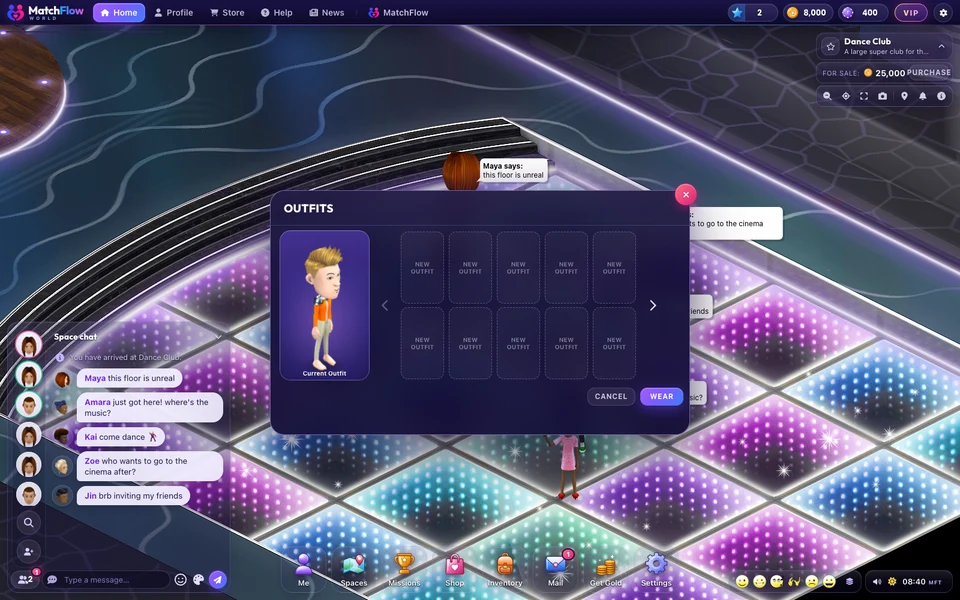
- Make your avatar yoursClick your own avatar for its menu: FACE opens the face creator, OUTFITS your saved looks, DANCES your dance moves and EMOTES the emote grid.
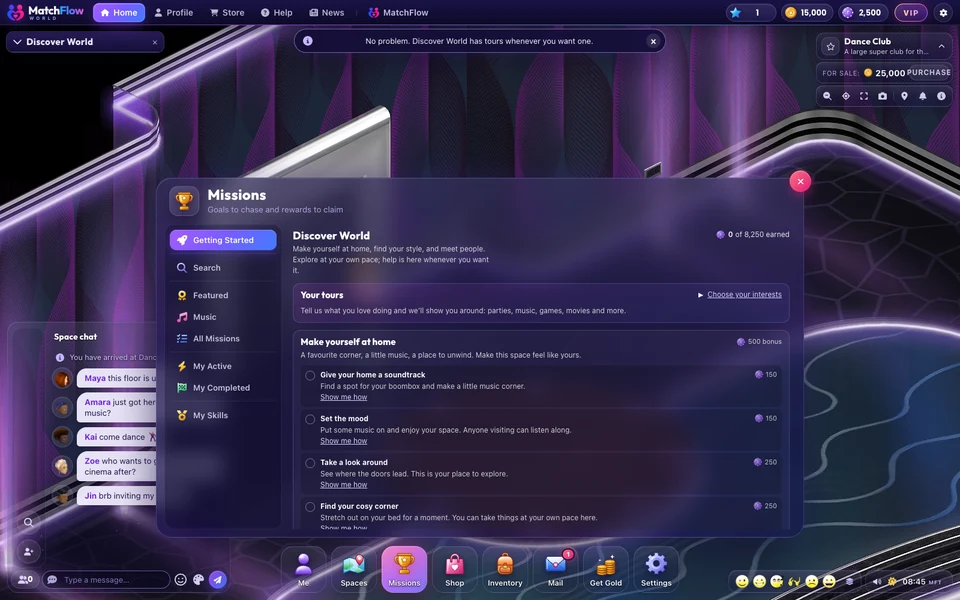
- Follow your first missionsOpen Missions on the dock. Getting Started shows the Discover World board: pick what you love doing, follow the steps and collect tokens as each one is done.
- Visit a venueOpen Spaces, choose the Official tab and press Go there on one of FreeWorlds' own venues.
- Bring your friendsInvite someone you talk to on MatchFlow with Hang out in World, or add friends in World and jump to them from the friends list.
What you get on your first visit
The first time you walk in, World gives you everything you need to start:
- The Beginner House, a small home with a garden, already furnished. It is yours to keep and to change. The furniture it comes with is bound to you: you can move it, put it away or get rid of it, but not gift or sell it.
- 2,500 tokens and 15,000 gold to spend in the Shop.
- A month of VIP and Citizen Level 10. VIP shows as Club Member and raises your outfit slots from 5 to 50.
- A welcome letter in Mail, and a boombox in your bag for your first mission.
Good to know: Gold, tokens and items can be sent to other members once you have played for 6 hours (time spent playing, not time away), on 3 different days and your account is 3 days old. In your first 30 days you can only send what you earned yourself: the bonus is yours to spend in the Shop. Buying from the Shop, receiving gifts and playing are never held back.
Finding your way round the screen
Everything starts from the dock along the bottom of the screen:
| Button | What it opens |
|---|---|
| Me | Your profile, your friends, invites and your privacy settings. |
| Spaces | Places to go: Popular, Official venues, your own spaces, and rooms for sale. |
| Missions | The Discover World board and your skills. |
| Shop | Clothes, wearables and furniture, priced in gold or tokens. |
| Inventory | Everything you own, ready to place or wear. |
| Letters and gifts. | |
| Get Gold | Daily Gold, free once a day. |
| Settings | Graphics, chat and your other preferences. |
The chat sits on the left, and the space you are in is named at the top right, with buttons for its information and for taking a snapshot.
The interests that shape your tours
Open Missions for the first time and World asks What do you love doing?: Partying, Music, Gaming, Movies, Fashion, Home and decor or Meeting people. Pick as many as you like and it shows you around the things you picked first. You can skip it and choose later.

Moving and looking around
- Walk: click a spot on the floor. Your avatar finds its own way round furniture and walls.
- Sit: click a chair, a sofa or a bench.
- Look around: drag with the right mouse button (or hold Shift and drag) to pan, scroll to zoom, and Q or E to turn the view.
- Go somewhere else: open Spaces and press Go there, or jump to a friend from the friends list by the chat.
Where to next
Once you're in, the other guides go deeper: your avatar and outfits, decorating your home, every mission chapter and bringing your friends. For where to go, see every MatchFlow venue, and for what the whole world has to offer, FreeWorlds at a glance.

Ready to start your story?
Your Beginner House is waiting. It takes a minute to get in.