

Guide · Start here
FreeWorlds Missions, Chapter by Chapter
Missions are World's way of showing you around: short steps that send you to the places and things worth trying, each paying tokens when it's done. This guide lists every chapter of the Discover World board, what each step asks and what it pays.
Free account, straight into World. Already on MatchFlow? Log in with the same account.
How missions work
Open Missions on the dock. Getting Started shows the Discover World board: 9 chapters of a few steps each. The other tabs list the skill missions, what you have going (My Active), what you've finished (My Completed) and your skills.
- World watches for you. You don't tick a step off yourself: when you do the thing, the game sees it and the step is done. Do something early and it still counts when you get to that step.
- Collect your reward. A finished step says Mission step complete with a Collect button. Each one also gives you 10 XP.
- Finish a chapter, get a bonus. Every chapter you complete pays 500 tokens on top of its steps, all but First steps.
- Hints show the way. A hint box points at the button to press next, with Show me and Skip step. Close it to explore without hints.
In all, the board pays 8,500 tokens.
Picking your interests
The first time you open Missions, World asks what you love doing: Partying, Music, Gaming, Movies, Fashion, Home and decor or Meeting people. What you pick decides which chapters it shows you around first. Hit the shops opens once you've finished Make yourself at home and Feel like yourself. Say hello opens once you've finished Make yourself at home and Feel like yourself, or as soon as you pick Meeting people.
Every chapter and what it pays
First steps
Talking, walking, your moves, your menu and the names of your buttons. About a minute.
| Step | What to do | Tokens |
|---|---|---|
| Say hi | Say hi to whoever is in the room. | 100 |
| Walk somewhere | Walk over to a glowing spot on the floor. | 100 |
| Make a face | Play a move from your action bar. | 100 |
| Open your menu | Open a panel from your menu. | 100 |
| Learn your buttons | Press ? to see the name of every button. | 100 |
Make yourself at home
A favourite corner, a little music, a place to unwind. Make this space feel like yours.
| Step | What to do | Tokens |
|---|---|---|
| Give your home a soundtrack | Find a spot for your boombox and make a little music corner. | 150 |
| Set the mood | Put some music on and enjoy your space. Anyone visiting can listen along. | 150 |
| Take a look around | See where the doors lead. This is your place to explore. | 250 |
| Find your cosy corner | Stretch out on your bed for a moment. You can take things at your own pace here. | 250 |
| Chapter bonus | Finish every step above. | 500 |
Feel like yourself
The avatar you arrived in is a starting point. Make it yours.
| Step | What to do | Tokens |
|---|---|---|
| Make your avatar yours | Try a look that feels like you, from your hair to your smile. | 200 |
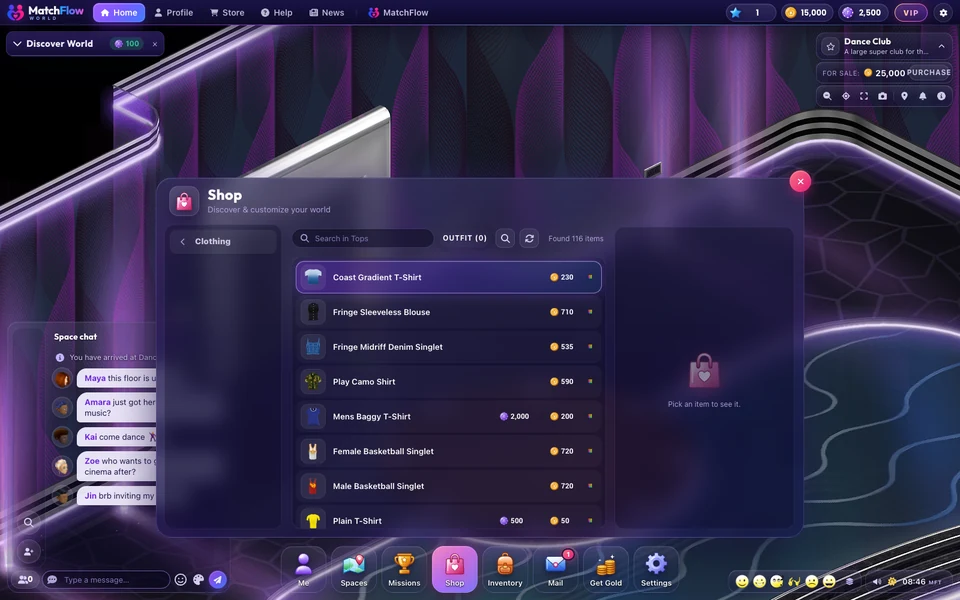
| Buy a new top | Pick a top that feels like you from the Shop's clothes. | 150 |
| Buy something for your legs | Trousers, shorts or a skirt to finish the look. | 150 |
| Put them on | Wear your new top and trousers. | 150 |
| Keep a favourite look | Save an outfit you love so you can come back to it whenever you like. | 150 |
| Chapter bonus | Finish every step above. | 500 |
A night at Scarlet Club
Red lights, good music and a dance floor that glows in hearts and roses.
| Step | What to do | Tokens |
|---|---|---|
| Go to Scarlet Club | World's red and black club: music, dancing and a good night out. | 100 |
| Dance at Scarlet Club | Get on the dance floor and show your moves. | 200 |
| Chapter bonus | Finish every step above. | 500 |
Front row at the Mainstage
A festival stage on its own island, with lasers, screens and fireworks in time with the music.
| Step | What to do | Tokens |
|---|---|---|
| Go to the Mainstage | World's festival stage, with a light show synced to the music. | 100 |
| Dance in the crowd | Join the crowd and dance to the show. | 200 |
| Cheer for the DJ | Let the DJ know you love it. | 150 |
| Chapter bonus | Finish every step above. | 500 |
Rack 'em up
Pool at Scarlet Club: play somebody, or practise on your own.
| Step | What to do | Tokens |
|---|---|---|
| Go to the pool tables | Scarlet Club's two pool tables are open to everyone. | 100 |
| Take a shot | Pick up a cue at Scarlet Club and take a shot, against somebody or on your own. | 200 |
| Chapter bonus | Finish every step above. | 500 |
Movie night
The FreeWorlds Cinema: one big screen, and everyone in the room watching together.
| Step | What to do | Tokens |
|---|---|---|
| Go to the Cinema | World's big screen, watched together. | 100 |
| Take a seat | Find a seat and settle in for the show. | 200 |
| Chapter bonus | Finish every step above. | 500 |
Hit the shops
Over three thousand things are for sale. Spend some of those tokens.
| Step | What to do | Tokens |
|---|---|---|
| Try something on | 100 | |
| Buy yourself a drink | 150 | |
| Drink it | 200 | |
| Chapter bonus | Finish every step above. | 500 |
Say hello
World is other people. Go and find some.
| Step | What to do | Tokens |
|---|---|---|
| Have a dance | 150 | |
| Go somewhere busy | 200 | |
| Make a friend | 250 | |
| Chapter bonus | Finish every step above. | 500 |
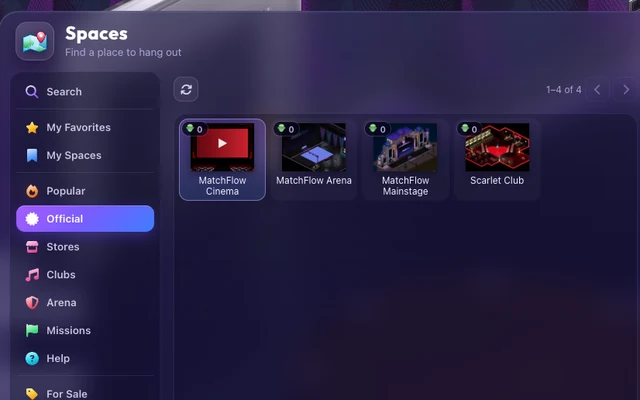
Where to go: 4 chapters send you to FreeWorlds' own venues: FreeWorlds Cinema (Movie night), FreeWorlds Mainstage (Front row at the Mainstage) and Scarlet Club (A night at Scarlet Club, Rack 'em up). Open Spaces and choose Official to get there.
Skill missions
Past the board, skill missions build up a skill a step at a time. Up to 5 can be active at once. Today they are all for the Music skill:
| Mission | What it asks | Tokens |
|---|---|---|
| Drop the needle | Put a track on for the room. | 100 |
| Build a set | Line up five tracks. | 150 |
| Find the beat | Tap the tempo of a track you put on. | 150 |
| Run the light show | Work the light desk while the music plays. | 200 |
| Call the drop | Hit the Drop cue right on time. | 200 |
| Play for a crowd | DJ for somebody who is listening. | 300 |
| Pack the floor | Keep three listeners with you. | 400 |
| Hold the decks | A full hour behind the decks. | 750 |
Each one also gives skill XP and MatchFlow XP, and some open only once an earlier one is done.
What to spend your tokens on
Tokens buy things in the Shop: clothes, wings and rides for your avatar, and furniture for your home. The Shop guide explains tokens, gold and Daily Gold. New to World? Start with getting started, or see everything there is to do.

Ready to start your story?
The Discover World board is waiting in Missions.