

Guide · Friends
Chat, Emotes and Whispers in FreeWorlds
Talking in FreeWorlds happens over your head: what you type floats up in a speech bubble for the room to see. Here's how bubbles, the space chat, emotes and private whispers work, and how to keep a conversation pleasant.
Free account, straight into World. Already on MatchFlow? Log in with the same account.
Speech bubbles and the space chat
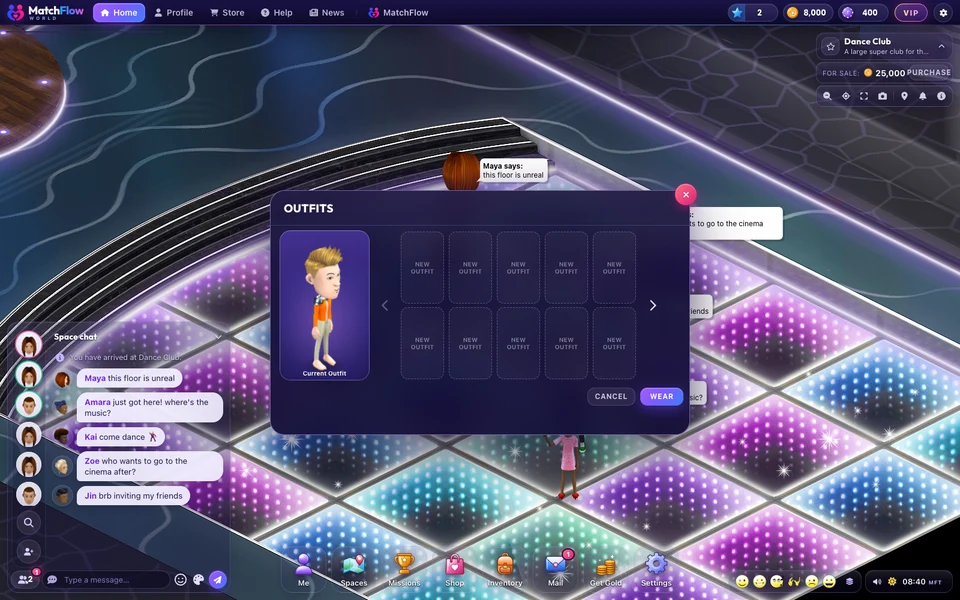
Type in the box at the bottom left and press Enter. Your line pops up in a bubble over your avatar for everyone in the room, and lands in the Space chat log so nobody misses it. A line can be up to 500 characters.
- Pick your colour: the Bubble colour button beside the chat bar offers 7 colours: white, cyan, blue, purple, red, yellow, green.
- Size the log: keep the chat short, make it tall to read back, or collapse it out of the way. On a phone it's collapsed or tall.
Emotes and gestures
The Emote button beside the chat bar opens the emote picker, and the same emotes sit on your action bar. There are three kinds:
| Kind | The emotes |
|---|---|
| Faces | Smile, Laugh, Whistle, Clap, Sad, Cheer, Angry |
| Gestures | Point, Stop, Wave, Thumbs Up |
| Dances | Dance 1, Dance 2, Dance 3, your own routines |
You can type some of them too: a smiley such as :D, or a whole line like /laugh. A few emotes ask for a level or VIP first. To make your own dances, see the avatar guide.
Whispers: talking to one person
A whisper is a line only one other person sees.
- Click someone's avatar and choose WHISPER, or click a friend in your friends list and choose START PRIVATE CHAT.
- The chat box now reads Whisper to and their name. Type and press Enter.
- Choose STOP WHISPERING to go back to talking to the room.
You can whisper anyone in the same room, and a friend anywhere in World, as long as their privacy setting lets friends see where they are.
Breaking the ice
The Say hello chapter of the missions is a good way to start talking: say something in a room, pull a face with an emote, have a dance, go somewhere busy and make a friend, collecting tokens for each. The busiest places are usually FreeWorlds' own venues and whatever is at the top of Spaces under Popular.
- Say hi to the room when you walk in: a wave (the Wave gesture) works just as well as words.
- Pick a bubble colour that stands out, so people can follow your lines in a crowd.
- Take it to a whisper when a conversation gets personal, or invite the person to your own place.
Keeping chat pleasant
- BLOCK (on someone's avatar, under MANAGE) stops them speaking to you, and hides you from each other everywhere on MatchFlow and in World.
- REPORT sends what they said to MatchFlow's moderators.
- Every line is checked after it's sent. Sexual content is taken down whenever someone in the room isn't a known adult, and anything involving minors is always removed. Strong language is masked in a room with anyone who isn't a known adult, and their mature language filter is always on.
Speaking another language? Settings, Chat has a Chat language choice and, where it's switched on, automatic translation of other people's lines.
More
For where to find people to talk to, see FreeWorlds' places; for bringing your own, inviting friends. For what hanging out in World is like, see a social virtual world.

Ready to start your story?
Walk into a venue, say hi and see who says it back.